Silence would be the ideal place to concentrate, but it is rare. Most of us work next to a colleague on a call, revise for exams in a flat with thin walls, or write while the street outside does its thing. Background noise can block a lot of that out, but used badly it becomes one more distraction. The wrong sound, a little too loud, makes it harder to think instead of easier.
This guide shows you how to use background noise on purpose. You will start from the thing that is actually distracting you, choose a sound that cancels it out and set a volume your ears can live with for hours. Then you will tie it to a timer and a routine, so that pressing play becomes the cue to start. Each step uses real settings in our free Focus Sounds mixer, but the method works with any noise generator.
How to Use Background Noise to Focus in 7 Steps
- Name your distraction: voices, sudden noises, too much quiet or your own restless thoughts.
- Choose a base layer of steady noise that covers it.
- Add a texture, such as rain or a stream, so the sound is pleasant enough to keep on.
- Set the volume to the lowest level that still hides the distraction.
- Match the sound to the task, because reading needs different sound from coding.
- Add a timer so every session has a clear start and end.
- Turn it into a ritual: save the mix and check how much focus time you actually get.
When Background Noise Helps — and When It Doesn’t
Background sound helps for one main reason: it hides things your brain can’t help paying attention to. The worst of these is speech. In a 2020 review of 14 lab studies, office acoustics researchers found that performance starts to drop as soon as nearby speech becomes even partly understandable. Tasks that involve remembering words suffered most. In those experiments, the researchers made speech harder to understand by adding steady broadband noise, which is exactly what a focus sound does. An earlier study with one of the same researchers found that the type of task matters too. A word-memory task was much more sensitive to background talk than a maths task.
Sound has a cost as well. A meta-analysis of 65 studies on reading found that noise, speech and music all slightly reduced reading comprehension. Understandable speech and songs with lyrics did the most damage. A 2023 study of more than 100 students found that music with lyrics hurt memory and reading. Instrumental lo-fi made no reliable difference. For noise itself, a 2024 meta-analysis found a small improvement in lab attention tests among children and young adults with ADHD symptoms, and a small cost for everyone else.
The practical rule follows from this. Use sound to cover a distraction, not as a goal in itself. If your room is already quiet, especially when you are reading, very quiet sound or none at all may suit you better. If people are talking, a steady, meaningless sound is far better than both their conversation and your playlist.
Step 1: Name What’s Breaking Your Focus
Different problems need different sounds, so start with a minute of honest listening. What actually pulls your eyes off the page? Most distractions fall into one of five groups:
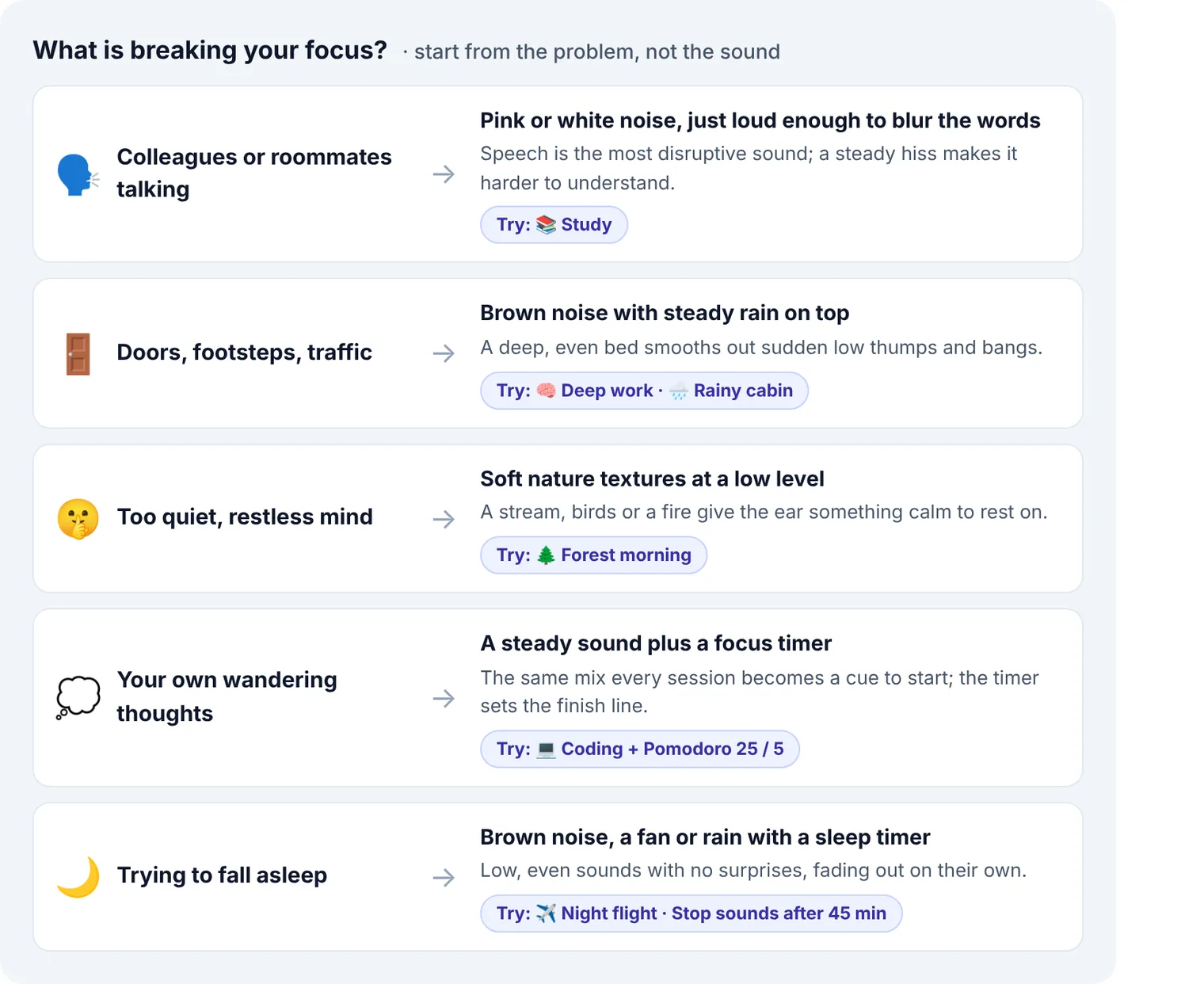
If two apply, say colleagues chatting and a door that keeps slamming, deal with the one you notice most first. You will layer in a second sound in Step 3.
Step 2: Choose a Base Layer That Covers the Distraction
The base layer is a steady noise that runs underneath everything. The three noise colours differ in where their energy sits, and that decides what each one hides best. Here is what the three generators in Focus Sounds actually produce, measured from their output:
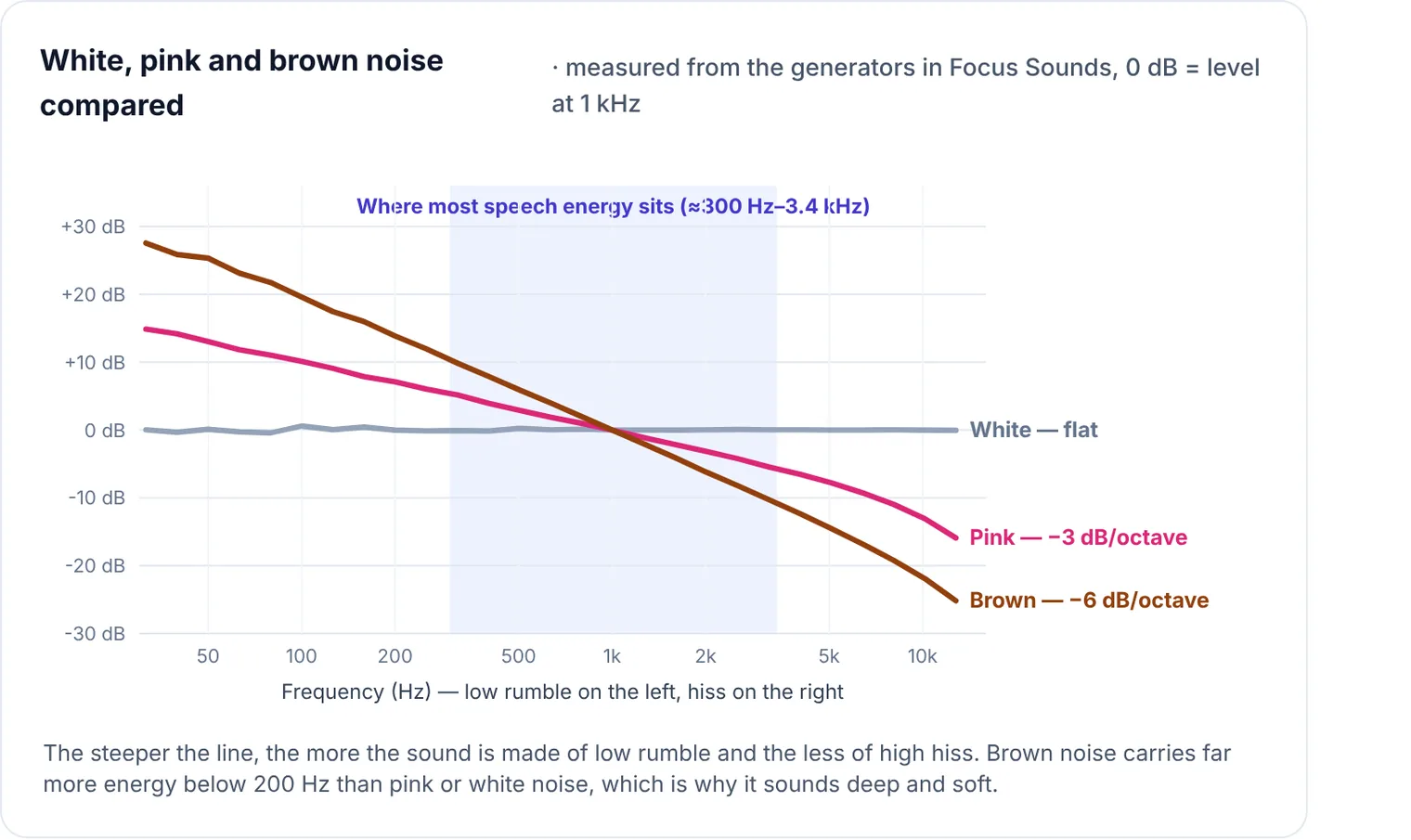
- For voices, use pink or white noise. Both have plenty of energy in the speech range, so they blur words into a murmur. Pink is easier to listen to for long stretches. White covers higher-pitched voices more firmly.
- For thumps, traffic and footsteps, use brown noise. Its energy is in the lows, where those sounds live, and it is the softest of the three to listen to.
- For both, layer pink and brown noise. That combination is the “Open-office shield” mix you will see saved later in this guide.
Every sound in Focus Sounds has a Darker / Brighter slider behind its ⚙ button. If white noise feels harsh, darken it a little rather than giving up on it. If brown noise feels muffled, brighten it.
Step 3: Add a Texture Layer You Actually Like
Plain noise covers well, but after an hour it can start to feel flat and tiring. A second, more natural sound on top gives your ears something pleasant to settle on and makes the mix easy to leave running. Good textures are steady and have no meaning: rain, a stream, wind, a crackling fire, a fan. Avoid anything with words or a melody.
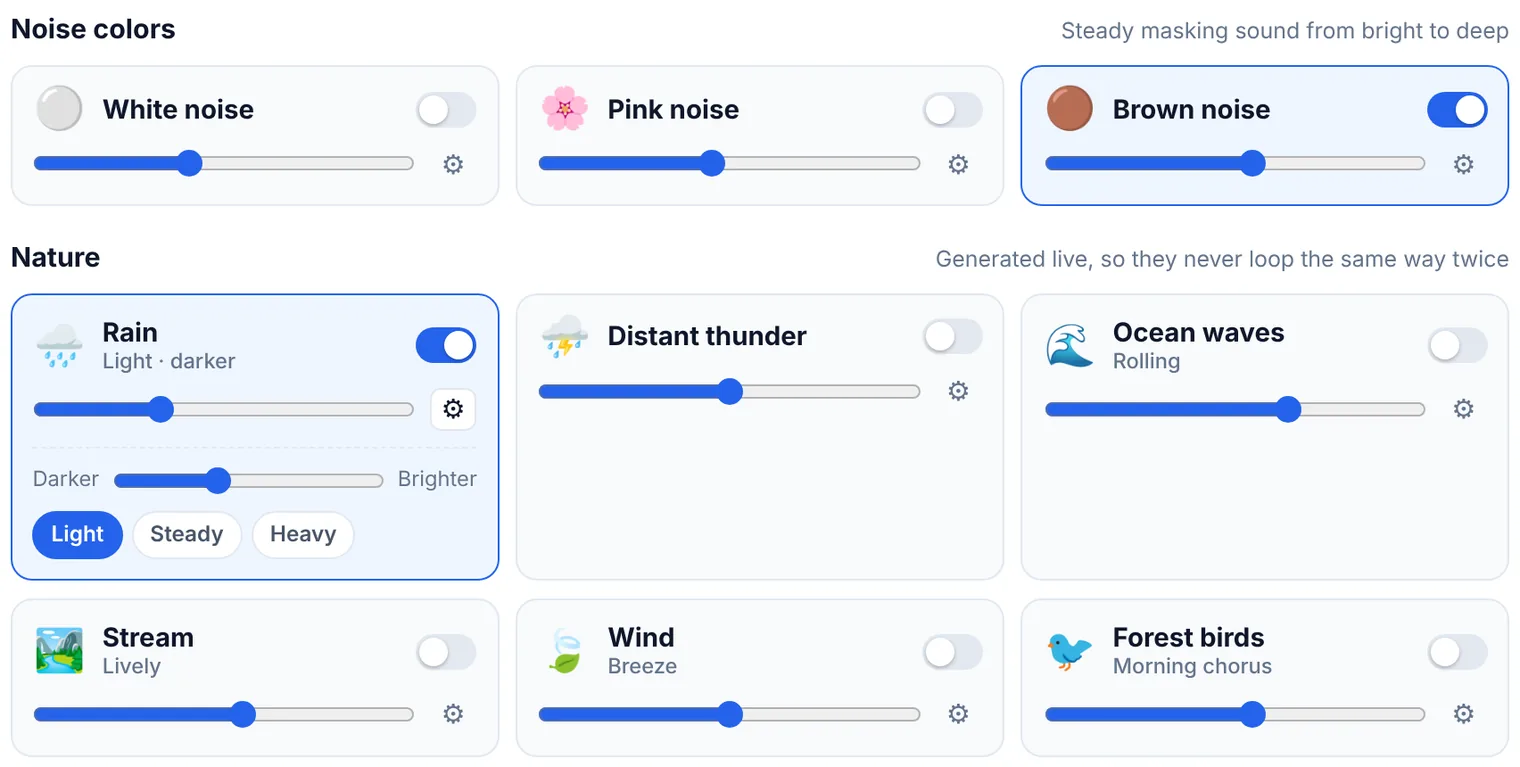
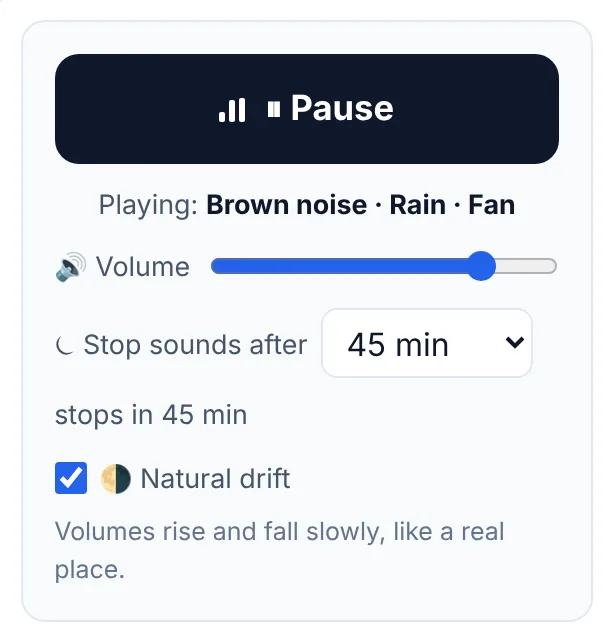
Keep the texture slightly quieter than the base. The base does the covering and the texture makes it comfortable. In Focus Sounds, many textures come in variations, so you can choose how busy they are: Light, Steady or Heavy rain, a Gentle or Lively stream, a Fireplace or a livelier Campfire. Leave Natural drift on. It lets each layer rise and fall slowly, so your brain doesn’t lock onto one unchanging hum.
Step 4: Set the Volume — Lower Than You Think
Volume is where most people go wrong. Sound that is too quiet lets words through. Sound that is too loud becomes the distraction itself, and over a long day it also strains your hearing. Use this simple test: start low while the distraction is actually happening, and raise the main volume slowly.
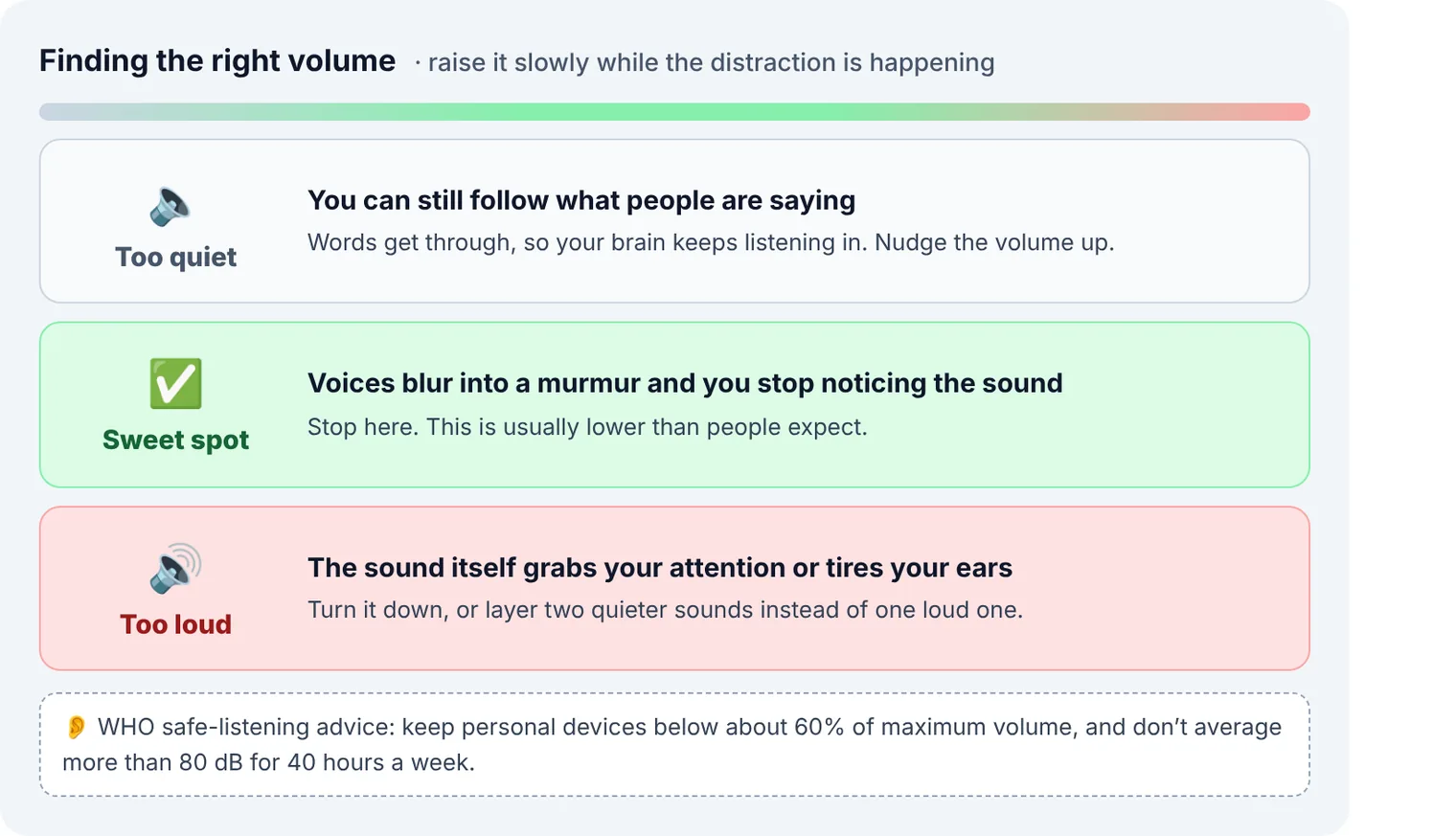
A few habits help:
- Set the mix first, the loudness second. Balance the layers with each sound’s own slider, then set the overall level with the main Volume slider.
- Check again after ten minutes. Your ears adjust and the room changes. If you have stopped noticing both the distraction and the sound, the level is right.
- Protect your hearing. The World Health Organization suggests keeping personal audio devices below about 60% of maximum volume. At an average of 80 dB you can listen safely for about 40 hours a week. At 90 dB, the safe limit falls to about four hours.
Step 5: Match the Sound to the Task
The research above shows that some kinds of work are far more sensitive to sound than others. Tasks that use words, such as reading, memorising and writing, are disturbed most. Number-crunching and routine admin can cope with more. Use this table as a starting point:
| Task | What tends to work | Avoid |
|---|---|---|
| Reading, memorising, revision | The quietest steady sound that hides voices: pink noise with a gentle stream, kept low. In a quiet room, consider silence. | Lyrics, podcasts, busy textures |
| Writing | Rain with a fireplace, or rain over brown noise | Songs in a language you understand |
| Coding, maths, spreadsheets | Brown noise with a low fan, a deep and even background | Sudden sounds such as thunder |
| Brainstorming and design | Gentle nature: birds, a stream, a light breeze | Harsh white noise at high volume |
| Email and admin | Whatever you enjoy. Low-stakes work can take more sound. | — |
| Winding down and sleep | Brown noise, steady rain, a fan or the airplane cabin, with a timer | Birdsong and thunder, which can wake you |
Step 6: Give Every Session a Start and an End
Sound blocks out the world, but it doesn’t tell you how long to keep going. That is a timer’s job. Francesco Cirillo’s Pomodoro Technique, from the late 1980s, uses 25-minute work blocks with short breaks. Many people doing deep work prefer longer blocks of 50 or 90 minutes. Pick the shortest block you can reliably stay focused for, and lengthen it once that feels easy.
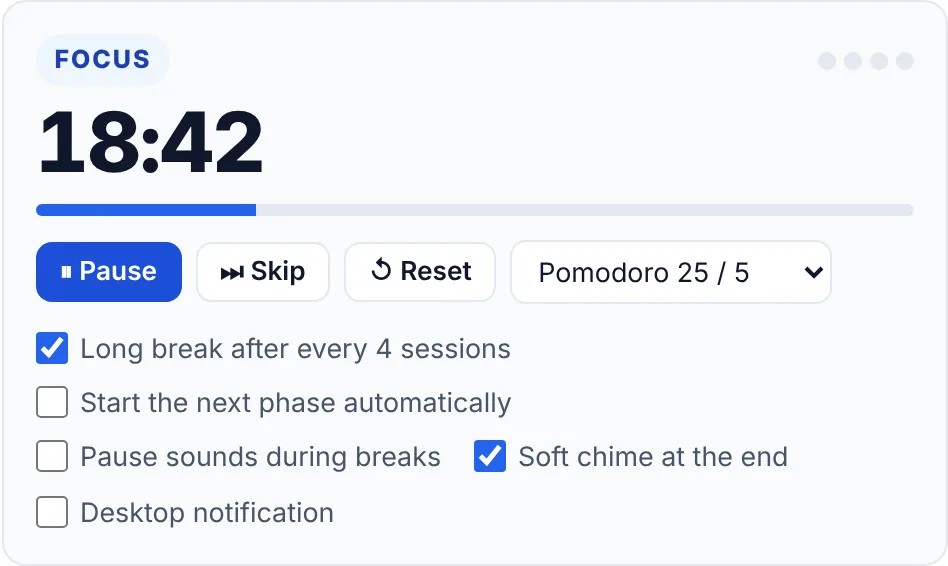
In Focus Sounds the timer sits next to the mixer. Choose Pomodoro 25 / 5, Deep work 50 / 10, Long focus 90 / 20 or Custom, then turn on a long break after every four sessions. Two settings make breaks feel like real breaks. Pause sounds during breaks lets the silence tell you to stand up. Soft chime at the end means you don’t need to watch the clock. If you would rather work without a timer, at least decide on one specific task before you press play.
Step 7: Turn Your Mix Into a Ritual
The last step is to make it a habit. When each kind of work always gets its own mix, pressing play soon becomes a signal to start, even before you feel motivated. Save a mix for each kind of task, such as one for writing, one for revision and one for the noisy office, so it is always one tap away.
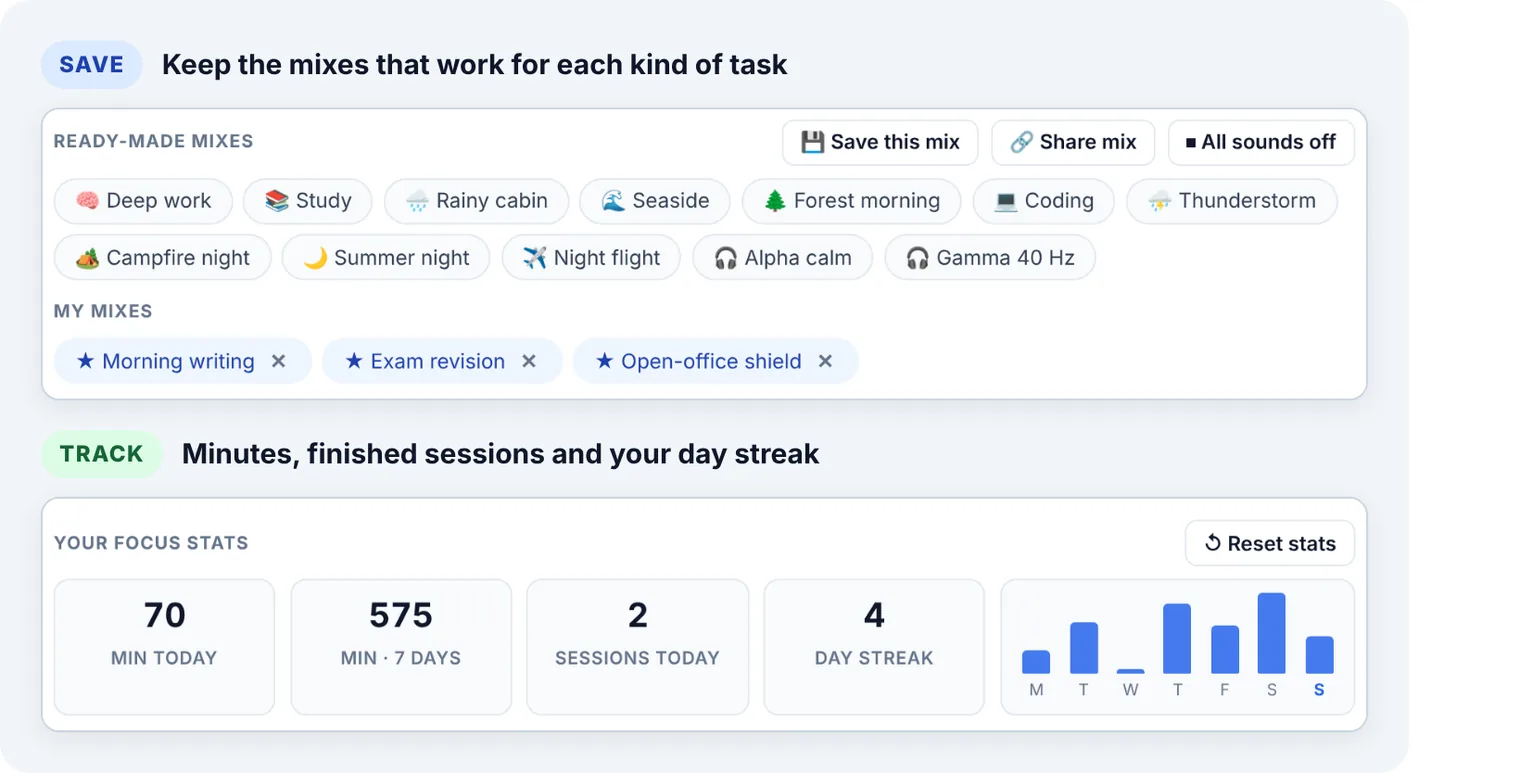
Look at your numbers once a week rather than every hour. If one mix keeps giving you longer sessions, use it more. If your minutes drop on the days you use a certain sound, try something else. Focus Sounds counts minutes while sound is playing and counts a session each time you complete one timed focus block. All of it is stored in your browser, nowhere else.
Six Focus Soundscapes to Try
Use these as starting points. Slider positions are rough, so adjust them until you reach the sweet spot from Step 4.
| Situation | Mix | How to set it up |
|---|---|---|
| Open-plan office | Pink noise + brown noise | Pink about halfway, brown a little lower. Save it as your office mix. |
| Exam revision | Pink noise + gentle stream | Start from the Study mix and darken the pink noise slightly. |
| Writing session | Light rain + fireplace | Rain a little louder than the fire. Choose Campfire if you want more crackle. |
| Coding sprint | Brown noise + low fan | The ready-made Coding mix, with a 50 / 10 timer |
| Creative morning | Birds + gentle stream + breeze | The ready-made Forest morning mix, kept low |
| Falling asleep | Brown noise + steady rain + low fan | All three low, with Stop sounds after set to 45 minutes |
For sleep, use the sleep timer rather than leaving sound on all night. During the final 90 seconds the volume eases down to nothing, so the switch-off never wakes you.
Common Mistakes With Focus Sounds
| Mistake | Better approach |
|---|---|
| Turning it up until you can’t hear anything else | Stop at the first level where voices blur, and keep your device below about 60% volume. |
| Using one loud sound | Use two quieter layers: a noise base with a natural texture on top. |
| Studying to songs with lyrics | Save songs for admin work. Use meaningless sound for reading and memorising. |
| Picking a new sound every session | Keep one mix for each type of task so it becomes a cue to start. |
| Using sound when the room is already quiet | Try silence first, especially for reading. Add sound only when something needs covering. |
| No end point | Add a focus timer, or for sleep a sleep timer that fades out. |
Frequently Asked Questions
Does background noise actually help you focus?
It helps most when it covers something worse, especially speech you can understand. On its own, sound tends to cost a little focus for most people, and reading is the most sensitive task. The exception may be people with ADHD symptoms, who in lab studies did slightly better with white or pink noise. So treat sound as a tool for noisy places, not something you need everywhere.
Is white noise or music better for studying?
For reading and memorising, steady noise or quiet instrumental sound is safer than music with lyrics. Lyrics compete with the words you are trying to process, and earlier studies suggest people often don’t notice the cost. Save your favourite songs for low-stakes tasks.
How loud should focus sounds be?
Just loud enough that nearby voices turn into an unreadable murmur, and no louder. Raise the volume slowly while the distraction is happening and stop at that point. For your hearing, keep personal devices below about 60% of maximum.
Should I use headphones or speakers?
Speakers are fine for covering a quiet room, and they are easier on your ears over a long day. Headphones help in shared spaces, because they hide more of the room at a lower volume. Binaural beats are the only sound that needs headphones.
Which noise is best for ADHD?
The best evidence so far is for white and pink noise, which gave a modest lift in attention tests for children and young adults with ADHD symptoms. Brown noise is popular but hasn’t been studied properly yet. Try all three at a low volume for a few sessions and keep whichever helps you most.
Is it okay to fall asleep with background noise?
Many people sleep better with a low, steady sound that hides traffic or a snoring partner. Keep it quiet, choose sounds without sudden changes (so no thunder or birdsong), and use a sleep timer so it fades out rather than playing all night.
Build Your First Focus Mix Now
Open the free Focus Sounds mixer and pick the row that matches your distraction from Step 1. Set the volume to the sweet spot, start a 25-minute session and save the mix when it works. Nothing is installed and there is no account. Your mixes and stats stay in your browser.
Sources
- Haapakangas, Hongisto & Liebl (2020) — The relation between the intelligibility of irrelevant speech and cognitive performance, Indoor Air
- Jahncke, Hongisto & Virjonen (2013) — Cognitive performance during irrelevant speech, Applied Acoustics
- Vasilev, Kirkby & Angele (2018) — Auditory distraction during reading: a Bayesian meta-analysis
- Journal of Cognition (2023) — Music with lyrics and cognitive performance
- Nigg et al. (2024) — White and pink noise and task performance in ADHD: systematic review and meta-analysis
- World Health Organization — Deafness and hearing loss: safe listening